
Easy Agile Personas is being discontinued
This page explains what this means for you and what to do before the app is fully retired.
What's changing
Easy Agile Personas will be removed from the Atlassian Marketplace in the coming weeks, at which point, new installs and renewals will not be avilable.
What happens at retirement depends on your hosting of Personas.
Jira Cloud
From May 2027, the app will stop working.
-
All persona data will be permanently deleted. Personas you have created will not be accessible or recoverable after this point.
-
The Persona and Importance to Persona custom fields will be permanently removed from your Jira instance, along with any values stored against your Jira issues.
We recommend saving your Persona data as soon as possible rather than waiting until closer to the retirement date.
Action required: Save your persona data and migrate any custom field values before the retirement date. Once the app is retired, this data cannot be recovered.
Data Center and Server
-
The Marketplace listing will be archived, but the app will remain installed on your server and will not be switched off remotely
-
Your persona data and custom fields will persist in your Jira instance and will not be deleted by Easy Agile
-
Once your current maintenance period expires, you will no longer receive support or app updates
-
You can continue running the installed version at your own discretion
Recommended action: Save your Persona data and migrate any custom field values before your maintenance period ends.
Key Dates
|
Date |
What’s happening |
|---|---|
|
May 2026 |
App removed from Atlassian Marketplace. No new installs or renewals available. Existing installs continue to work. |
|
Your maintenance expiry (DC/Server only) |
Easy Agile's support and update obligations end. The app continues running on your server but will not receive further development. Complete your data migration before this date. |
|
May 2027 (Cloud Retirement Date) |
App stops working for all Cloud customers. Persona data and custom fields are permanently deleted. |
What you need to do
If you’re on Jira Cloud
Your persona data will be permanently deleted when the app is retired. We recommend acting as soon as possible.
Before the app is retired, save any Personas you want to keep. A few ways to do this:
-
Take a screenshot - capture each persona as an image to store or share with your team
-
Copy into Confluence - paste your persona content into a Confluence page to keep it accessible
-
Save to a document - copy and paste the details into a Word doc, Google Doc, or similar
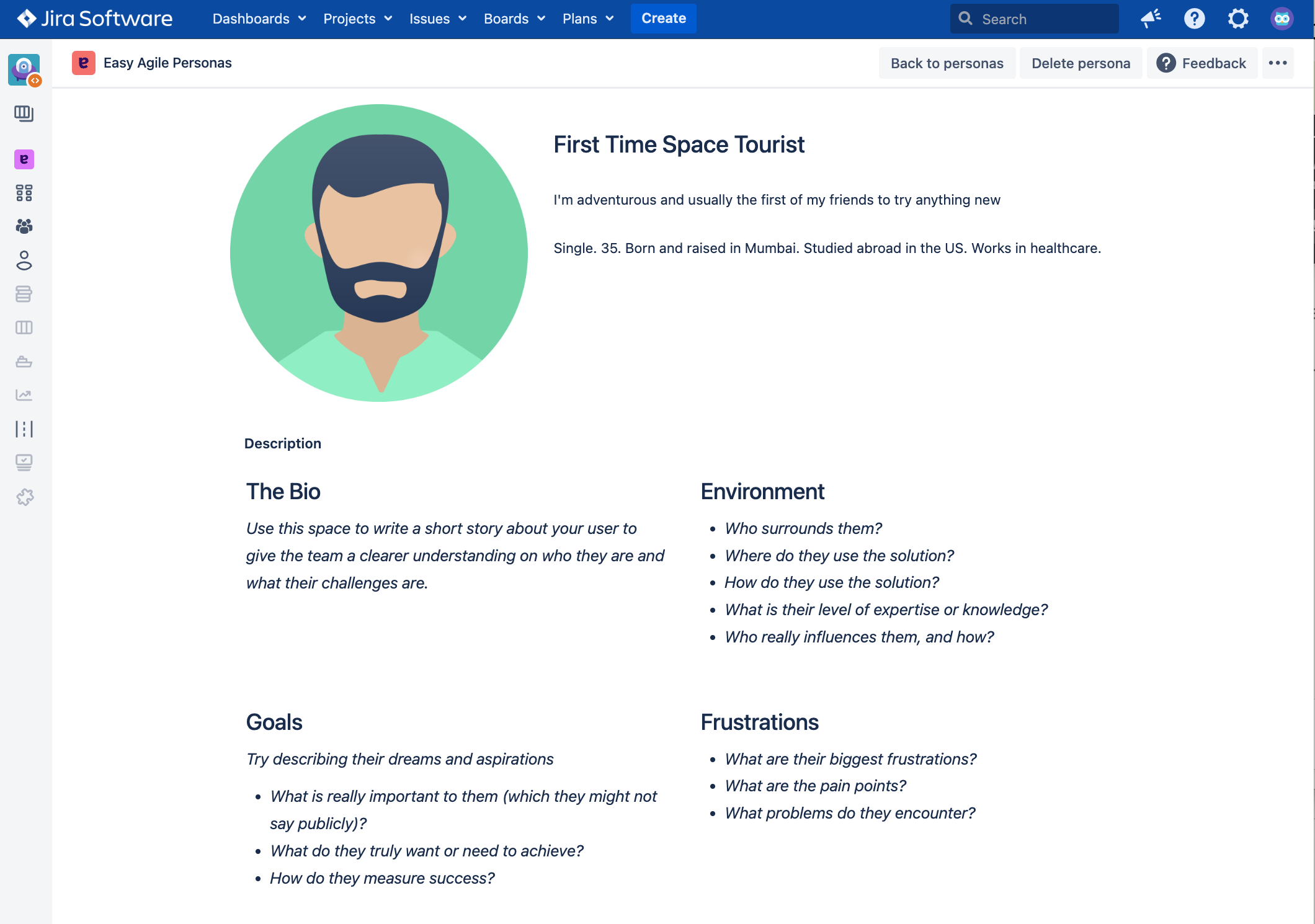
You should also identify and migrate any custom field data before retirement — see About your Jira custom fields section below.
If you’re on Jira Data Center/Server
Your persona data will not be deleted by Easy Agile — it remains on your server after the Marketplace listing is archived. However, once your maintenance period ends you will no longer be eligible for support.
We recommend completing the following before your maintenance period expires:
Save any persona content you want to preserve in a portable format (screenshot, Confluence page, or document), and migrate any custom field data you want to retain in an app-independent Jira field. See About your Jira custom fields section below.
If you are unsure when your maintenance period ends, contact our support team and we will check for you.
About your Jira custom fields
Personas adds two custom fields to your Jira instance:
-
Persona - links a Jira issue to a specific Persona
-
Importance to Persona - records how important an issue is to a given Persona
When the app is retired, these fields and all values stored in them will be permanently removed from your Jira issues. This applies across all projects where the fields have been used.
If this data matters to your team, follow the steps below to identify affected issues and preserve the data before the app shuts down.
Step 1 - Find issues with persona data using JQL
Use the following JQL searches in your Jira project to identify which issues currently have persona values assigned.
To find issues with a Persona value set:
"Persona" is not EMPTY
To find issues with an Importance to Persona value set:
"Persona Importance" is not EMPTY
To find issues where either field is populated:
"Persona" is not EMPTY OR "Persona Importance" is not EMPTY
Step 2 - Create replacement custom fields in Jira
If you want to continue tracking persona-related data in Jira after the app is retired, you can create new custom fields to replace the ones Personas managed. The steps differ slightly depending on whether you're on Jira Cloud or Data Center.
Jira Cloud
Follow Atlassian's guide: Create a new field — Jira Cloud
When creating each field:
-
Go to Jira Settings → Fields → Create new field
-
Choose Select List (single choice) as the field type
-
Name the field to match your existing data (e.g. Persona, Importance to Persona)
-
Add the options customers can choose from (e.g. your persona names, or values like High / Medium / Low)
-
Associate the field with the relevant projects and screens
Jira Data Center/Server
Follow Atlassian's guide: Adding custom fields — Jira Data Center
When creating each field:
-
Go to Administration → Issues → Custom fields → Add custom field
-
Choose Select List (single choice) as the field type
-
Name the field to match your existing data (e.g. Persona, Importance to Persona)
-
Configure the field context — set it globally or limit it to the specific projects where you were using Personas
-
Add the field to the relevant screens so it appears on your issues
Once your new fields are created — bulk update your issues
Use Jira's bulk edit to populate the new fields from the values you recorded in Step 1:
-
From your JQL search results, select all issues using the checkbox at the top of the list
-
Choose Actions → Bulk edit
-
Select your new custom field and apply the appropriate value
Questions?
If you have any questions, contact our support team.