
Easy Agile TeamRhythm data migrates with the Jira Cloud Migration Assistant (JCMA).
Before you migrate, upgrade Easy Agile TeamRhythm for Data Center to 15.8.1 or later (Jira 9 and 10) or 16.8.1 or later (Jira 11). Earlier versions work with JCMA until 31 December 2026, but their TeamRhythm data takes longer to appear in Jira Cloud after the migration finishes. From 1 January 2027, JCMA will only migrate TeamRhythm data from these versions or later. If you're partway through a migration, you can upgrade and continue: running JCMA again won't duplicate data already in Cloud.
If you're migrating from an on-premise (Server or Data Center) Jira site to Cloud, Atlassian recommends using JCMA.
When Easy Agile TeamRhythm is included in a JCMA migration, JCMA migrates TeamRhythm data for each migrated Jira project, including user story maps, retrospectives, planning poker sessions, Saved Views, Issue Hierarchy and Card Configuration.
Migrating to Cloud? Learn more about how Easy Agile keeps your data secure here.
Pre-requisites
To include Easy Agile TeamRhythm in a JCMA migration, you’ll need:
-
Easy Agile TeamRhythm 15.8.1 or later (Jira 9 and 10) or 16.8.1 or later (Jira 11) on the origin Data Center site
-
If you ran test migrations on an earlier version, run another test migration after you upgrade to 15.9.0 or 16.9.0.
-
-
Easy Agile TeamRhythm installed on the destination Cloud site
Expired app license on Jira Server? You can still download the latest (Data Center) version of the app from the Atlassian Marketplace, and upload this to your Jira Server site.
The app will show an “Unlicensed” page when using a version your license does not include access to. However, the JCMA integration will still work without an eligible license.
How does it work?
-
Update the Easy Agile TeamRhythm and JCMA apps to the latest version.
-
Using earlier versions reduces the chance of a successful migration.
-
-
During the Assess your apps stage, select “Needed in Cloud” for Easy Agile TeamRhythm.
-
Follow the steps on how to use the Jira Cloud Migration Assistant to migrate data to your Cloud instance.
-
App data associated with your migrated Jira data will be migrated as one of the last steps in the JCMA migration.
When running a JCMA migration, you’ll choose which Jira projects will be migrated. Easy Agile TeamRhythm will migrate all app data associated with the Jira data that is now on the Jira Cloud site.
-
For example, Retrospectives will be migrated once you've migrated the Jira board they were created on.
-
When an additional level of hierarchy is configured for the User Story Map on a migrated Jira board, it can only be migrated when the other Project selected in that hierarchy has also been migrated.
Limitations
-
JCMA currently does not support migrating TeamRhythm references to Quick Filters.
-
Jira's native Quick Filters migrate as part of standard Jira board configuration and appear in TeamRhythm Cloud as expected. What JCMA does not migrate is any app-level reference TeamRhythm stores to those filters.
-
-
App data cannot be migrated if the associated Jira data is not found on the destination Jira Cloud site.
-
If you migrate from a TeamRhythm version earlier than 15.8.1 (Jira 9 and 10) or 16.8.1 (Jira 11), your TeamRhythm data takes longer to appear in Jira Cloud after the migration finishes, and longer again for large migrations. Upgrade before you migrate to avoid the wait.
-
Easy Agile TeamRhythm doesn't support cancelling an app migration in JCMA.
Staged migrations
If you are planning a staged migration, we recommend enabling Easy Agile TeamRhythm for all migrations. This allows it to migrate the app data associated with the Jira projects in each migration. The app does not need a separate migration.
It’s safe to include Easy Agile TeamRhythm in every migration. It will not create duplicates, and will automatically skip already-migrated data.
Easy Agile TeamRhythm will migrate app data associated with any Jira data now on the destination Jira Cloud site. This includes Jira data/boards migrated in the current or previous migrations.
Troubleshooting a TeamRhythm JCMA migration
Check what version of Easy Agile TeamRhythm was installed on the origin Jira Server / Data Center site during the migration. If you’re not using the latest version, this may cause problems with the migration.
Duplicate TeamRhythm data after running a migration again: running JCMA again doesn't create duplicates. If you see duplicated data, contact the Easy Agile Support Team.
App migration logs on Cloud
You can review the results of a migration of Easy Agile TeamRhythm data on the destination Jira Cloud site. This is available for Jira Administrators by navigating to:
-
Jira Cloud’s global settings → “Manage Apps”
-
Then, in the left navigation pane under “Easy Agile TeamRhythm” → “Migration Assistant”
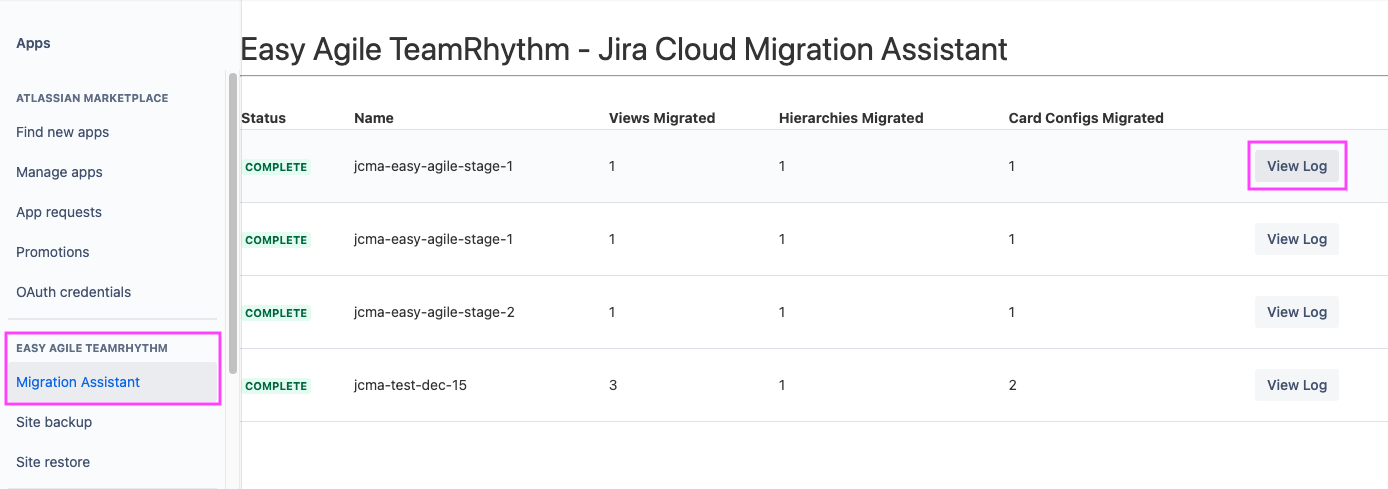
Here, you can view the list of ongoing and past JCMA migrations. Select “View Log” to access detailed logs for each migration.
Our support team may ask for a copy of these logs while troubleshooting a migration.
App links missing from multi-project boards
The User story map and Retrospective pages are shown in the “project tabs”.
On Jira Cloud, if a board’s Location is set to a person (instead of a project), apps and other pages will be missing from the “project tabs”.
Multi-project boards migrated from Jira Data Center/Server are sometimes automatically assigned to a person instead of a project.

Change the board’s location to a project to make app and other pages available.
We are here for you!
Our team is here to help with your JCMA migration. If you have any questions or concerns, please contact our support team!