
Roadmap items let you plan and shape work directly on your Easy Agile Roadmap before creating a Jira work item.
They appear on your roadmap timeline and behave like other items. You can schedule, move, and update them but they only exist in Easy Agile Roadmaps until you convert them to a Jira work item.
If you want to add or create Jira work items instead, see Create items on the roadmap.
Why use roadmap items?
Roadmap items give you space to think, shape, and communicate work before committing to Jira.
Use them to:
-
Plan early: Sketch out potential initiatives and see how they fit on the timeline before your team commits to delivery.
-
Tell a clearer story: Use business-friendly language that resonates with executives and stakeholders, instead of exposing technical epic names.
-
Explore scenarios: Test options, adjust timelines, and get buy-in without creating and later deleting multiple Jira work items.
-
Prioritise visually: Compare ideas on the roadmap and decide what matters most before work begins.
Create a roadmap item
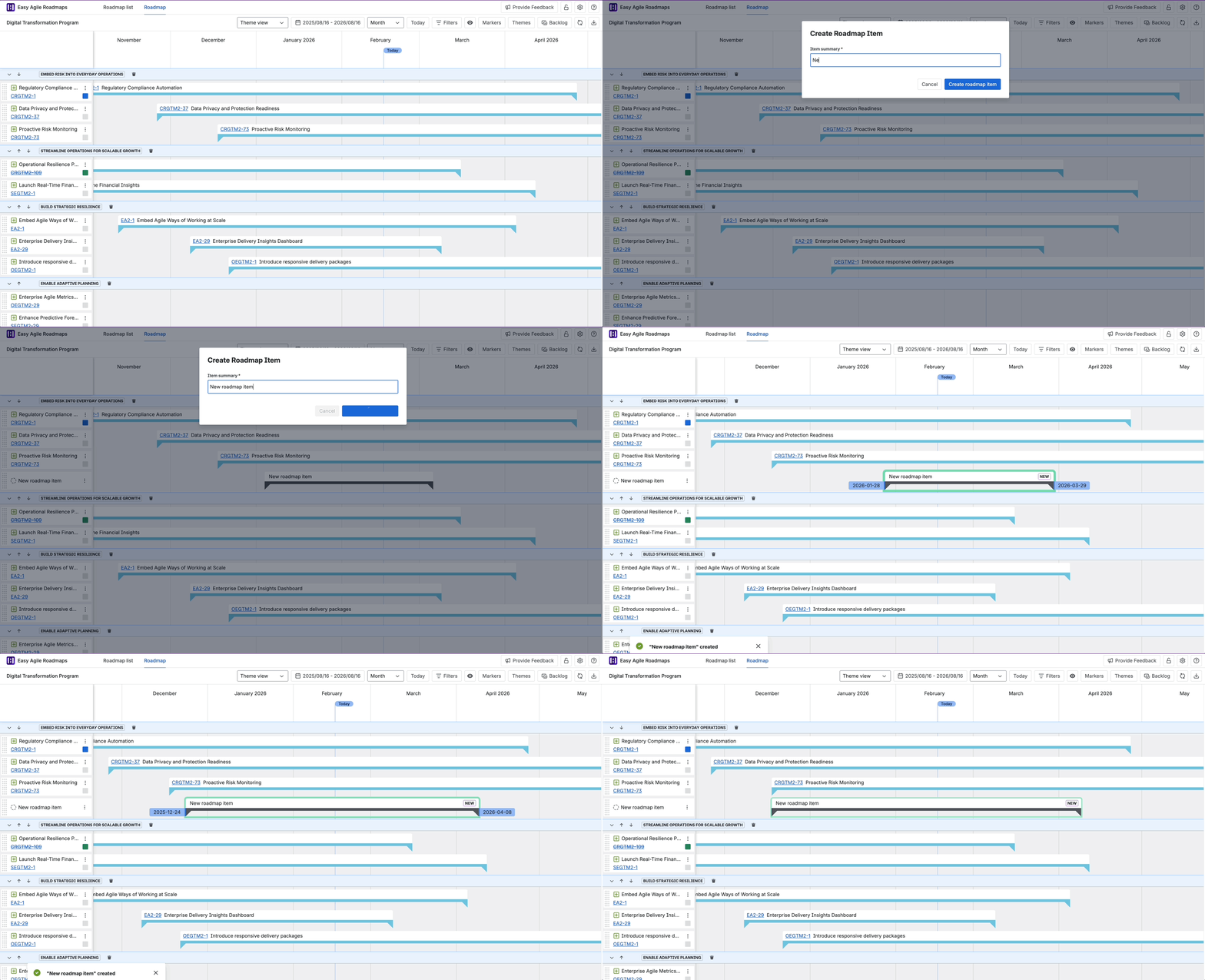
You can create a roadmap item within a theme on the roadmap timeline.
-
Hover over a theme row
Move your mouse over the left-hand side of a theme row. A + icon will appear. -
Click the + icon
-
Enter a name for the roadmap item
Add a short, clear name that reflects the outcome or initiative.
The roadmap item will appear immediately on the timeline in the theme where you created it.
Work with roadmap items
Once created, a roadmap item behaves like other items on your roadmap.
You can:
-
Schedule or reschedule it by dragging it along the timeline
-
Move it within the same theme
-
Rename it
-
Delete it if it’s no longer needed
Convert a roadmap item to a Jira work item
When you’re ready to track the work in Jira, you can convert a roadmap item.
-
Open the roadmap item.
-
Select Convert to Jira work item.
-
Choose the relevant Jira project and issue type.
-
Complete any required details.
-
Create the work item.
The new Jira work item replaces the roadmap item on your roadmap and behaves like any other Jira item.
Things to know
-
Roadmap items are only available in the Theme view (not yet in the Hierarchy view).
-
They exist only in Easy Agile Roadmaps until converted to a Jira work item.
-
Roadmap items sit at the bottom of each theme. They can’t be ranked between Jira work items and don’t affect Jira ranking.
-
You’ll need permission in Jira to create work items when converting a roadmap item.