
When to use Team Insights
Team Insights is most effective when used as part of your team's regular feedback and improvement cycles. This page provides guidance on how to get the most value from Team Insights.
Using Team Insights in Team Rituals
Retrospectives
Team Insights is designed as a conversation starter for retrospectives. Use it to ground your retrospective discussions in data.
Before the retrospective:
-
Generate Team Insights for the sprint or time period you're reviewing (use appropriate Analysis Period filter)
-
Review the insights and identify 2-3 key topics to discuss
-
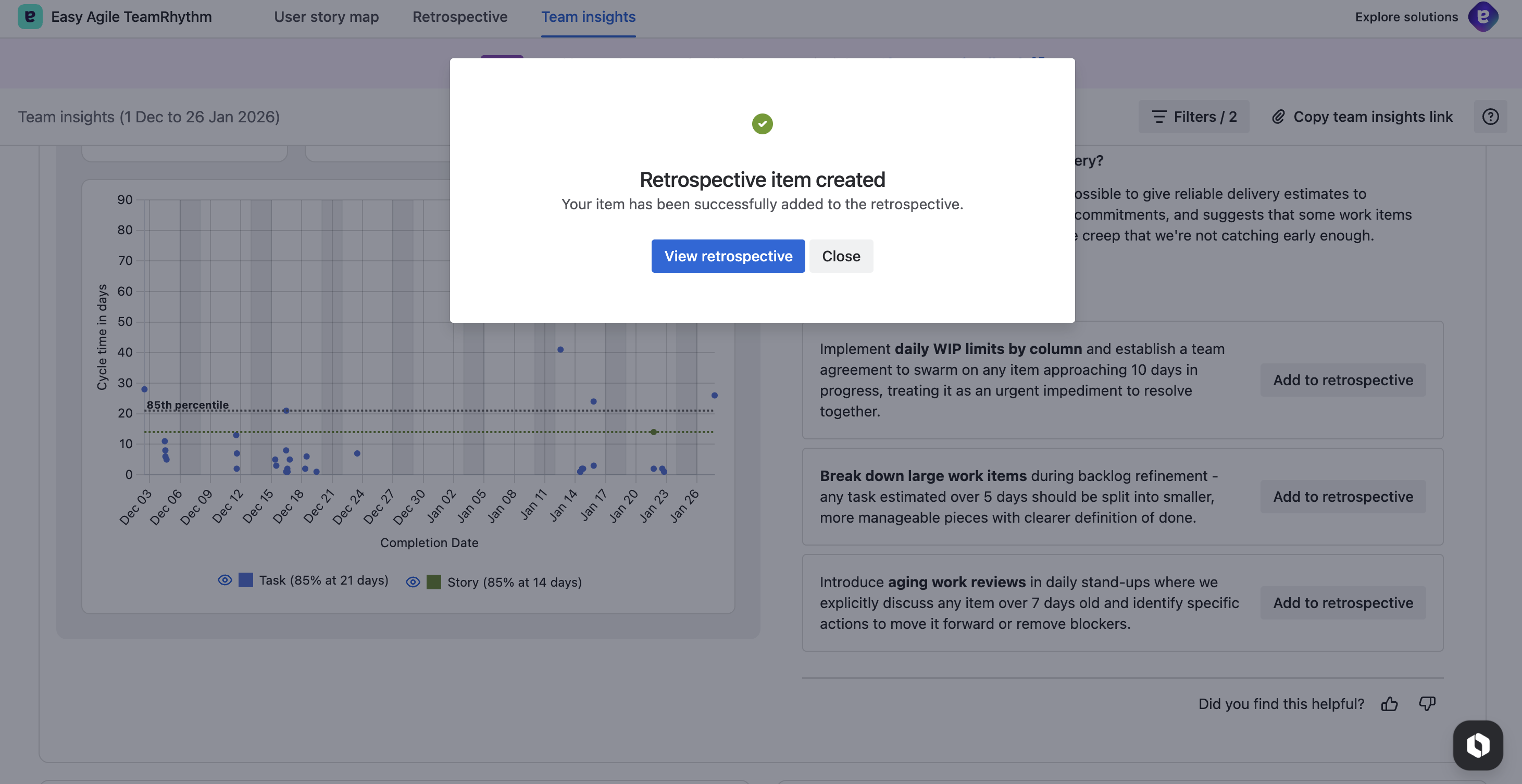
Use the "Add to retrospective" button on each relevant recommendation to capture them directly into your retro — you can choose the specific retrospective, select a column (Start, Stop, Continue, or Comments), edit the text, and optionally post anonymously
During the retrospective:
-
Share your screen showing Team Insights to provide visual context
-
Walk through the key insights together as a team, hovering over work item keys to highlight them on the chart, or click them to open the full work item details in a panel
-
Use the definition tooltips to help team members understand key metrics like cycle time and percentiles
-
Combine quantitative insights with qualitative team knowledge
-
Document actions as retrospective actions items convert selected ones to jira items and plan into future sprints
After the retrospective:
-
Track completion of the action items in the incomplete actions column of Retrospectives
-
Compare new insights to review the impact, using the comparison indicators on metrics to see trends.
Sprint Planning & Forecasting
Use cycle time and throughput data to inform your planning.
How many items can we commit to?
-
Check your Average Weekly Throughput to understand typical completion rates
-
Review Median Cycle Time to understand how long work typically takes
-
Consider Peak Daily WIP when deciding how much work to pull in
-
Use the User Story Map to plan work focused on completing epics in the next and nearest sprints
-
Use the swim lane points tracker to ensure committed work aligns with throughput
-
Plan converted action item/s into upcoming sprints to drive small, incremental improvement within capacity.
Should we break down this story?
-
Compare the estimated size to your 85th percentile cycle time
-
If it's likely to exceed this threshold, consider breaking it down
-
Look at outliers on the Cycle Time Scatterplot to understand why larger items have occurred to inform story splitting and definition of ready
-
Use the Quick Create item to create new Epics and Stories on the User Story Map and visualise them in context of other work
-
Run planning poker sessions to estimate the work and compare complexity with items completed within the 85th percentile.
Team Health Checks
Use Team Insights monthly or quarterly to monitor team health trends.
Monthly health check:
-
Run Team Insights with "Past 30 days" filter
-
Compare to previous month (change analysis period to understand trends)
-
Look for concerning patterns (rising cycle time, increasing WIP, declining throughput)
-
Celebrate improvements and acknowledge challenges
Quarterly review:
-
Run Team Insights with "Past 90 days" filter
-
Review all three charts for longer-term trends
-
Discuss with leadership or stakeholders if needed
-
Set team improvement goals for the next quarter
Data Quality Best Practices
The quality of your insights depends on the quality of your Jira data.
Ensure Workflow Accuracy
-
Map your workflow correctly: Regularly review your board setup and workflow to ensure that it matches how your team gets work done.
-
Update work items regularly: Encourage team members to move work items through the workflow in real-time, not just at stand up or certain times of the week. The key word is 'flow'.
Learn more on how to check and set up your Jira board workflow configuration:
https://support.atlassian.com/jira-cloud-administration/docs/configure-workflow-schemes/
Complete Work Items Properly
-
Don't leave work in progress: Complete work items when they're truly done, moving items to the final step of your board's workflow
-
Use consistent definitions of done: Ensure all team members complete items the same way and are truly complete to your definition
Maintain Consistency
-
Standardise work item types: Use consistent issue types across the team and agree as a team when you will use which item types
-
Avoid workflow workarounds: Avoid create parallel or shadow processes outside Jira
-
Keep historical data: Avoid bulk-delete or archive for old work items as they're valuable for trend analysis. Filters can help reduce visual noise where needed.
Interpreting Insights
Issues with High Cycle Time
When Team Insights flags work items with particularly high cycle time:
-
Set aside some time for dedicated reflection - create a retro outside of cycle to simply capture the conversations and actions
-
In Team Insights Click the work item key to view details
-
Look for common patterns:
-
Were requirements unclear?
-
Did the work encounter external dependencies?
-
Was the item too large or complex?
-
Did the work experience frequent interruptions?
-
-
Add ideas and thoughts to the retro and discuss as a team to understand root causes -
-
Consider process changes to address systemic issues - capture as actions with owners
-
Track the impact of change to working practices back in Team Insights
Example:
"Extreme cycle time variability with significant outliers. Our cycle time data shows concerning volatility, with 7 outliers representing 11% of completed work taking longer than expected. The most extreme case is USM-7780 at 89 days."
Good team response:
-
Review USM-7780 to understand what happened
-
Identify if it's an isolated incident or a pattern
-
If it's a pattern, look for commonalities (work type, detail, dependencies)
-
Implement preventive measures (further work breakdown, clearer requirements, dependency tracking)
Incomplete or Inconsistent Data
If your insights seem off or don't match your team's experience:
Check for:
-
New board or recent migration: Do you have enough data for meaningful trends, how much more do you need - 60-90 days?
-
Board Workflow: Ensure your board workflow accurately reflects how you work, consider adding more detailed in progress states to the flow than just In Progress.
-
Inconsistent workflows: Verify team members are following the agreed-upon workflow, the time spent in the workflow impacts the accuracy of cycle time.
-
Bulk imports or data issues: Recent data migrations or imports may skew results
-
Making the data look good: Team Insights are just that, insights to improve understanding of where changes can help achieve better outcomes. Moving items to make the metrics look good masks what's really happening - positive and negative.
[IMAGE: Data quality checklist]
Suggested image: Visual checklist showing key data quality checks (workflow mapping, status updates, completed items, etc.)
Getting Started: Your First 30 Days
Week 1: Exploration
-
Generate your first Team Insights report (use Past 60 days)
-
Review all three charts and get familiar with the interface
-
Click around—hover over work items, try legend filtering
-
Read through the insights without pressure to act
Week 2: Context Building
-
Compare different time periods (Past 30 days vs Past 90 days)
-
Apply work item type filters to understand each type's performance
-
Identify 2-3 insights that resonate with your team's experience
-
Share Team Insights with your team or area lead or delivery lead
Week 3: Team Discussion
-
Present Team Insights in a team meeting or retrospective
-
Gather team reactions and validate insights against lived experience
-
Identify data quality issues that need addressing
-
Choose one insight to explore more deeply
Week 4: First Action
-
Select one recommendation from Team Insights to try
-
Implement a small change based on the insight
-
Document the change (capture in Retros) and commit to reviewing impact in 30 days
-
Set a calendar reminder to check Team Insights monthly
Common Scenarios
"Our Insights Don't Match Our Experience"
This often indicates data quality issues:
-
Check that your Jira workflow is configured correctly
-
Verify that team members are updating statuses in real-time
-
Ensure you're using the right analysis period and filters
-
Consider whether the team's perception matches reality (data can surface blind spots)
"We Have Very Few Completed Items"
If you have less than 10 completed items in your analysis period:
-
Expand the analysis period to 90 days or use a custom range
-
Check if work items are being completed but not moved to final statuses
-
Consider if your team works on large, long-running items (adjust analysis period accordingly)
"Our Cycle Times Are Very Long"
Long cycle times aren't inherently bad—it depends on your context:
-
Consider the type of work (enterprise architecture vs bug fixes)
-
Review your workflow—do items sit idle between status changes?
-
Look at WIP and throughput—are you taking on too much at once?
-
Evaluate if large work items should be broken down
Next Steps
-
Troubleshooting & FAQs - coming soon